
How to Make AI Dating Photos Look Real (Not Plastic)
Why most AI dating photos look fake, and the photographer-level checks that make them pass as real. Hands, teeth, jewelry, lighting, and the final-6 curation rule.
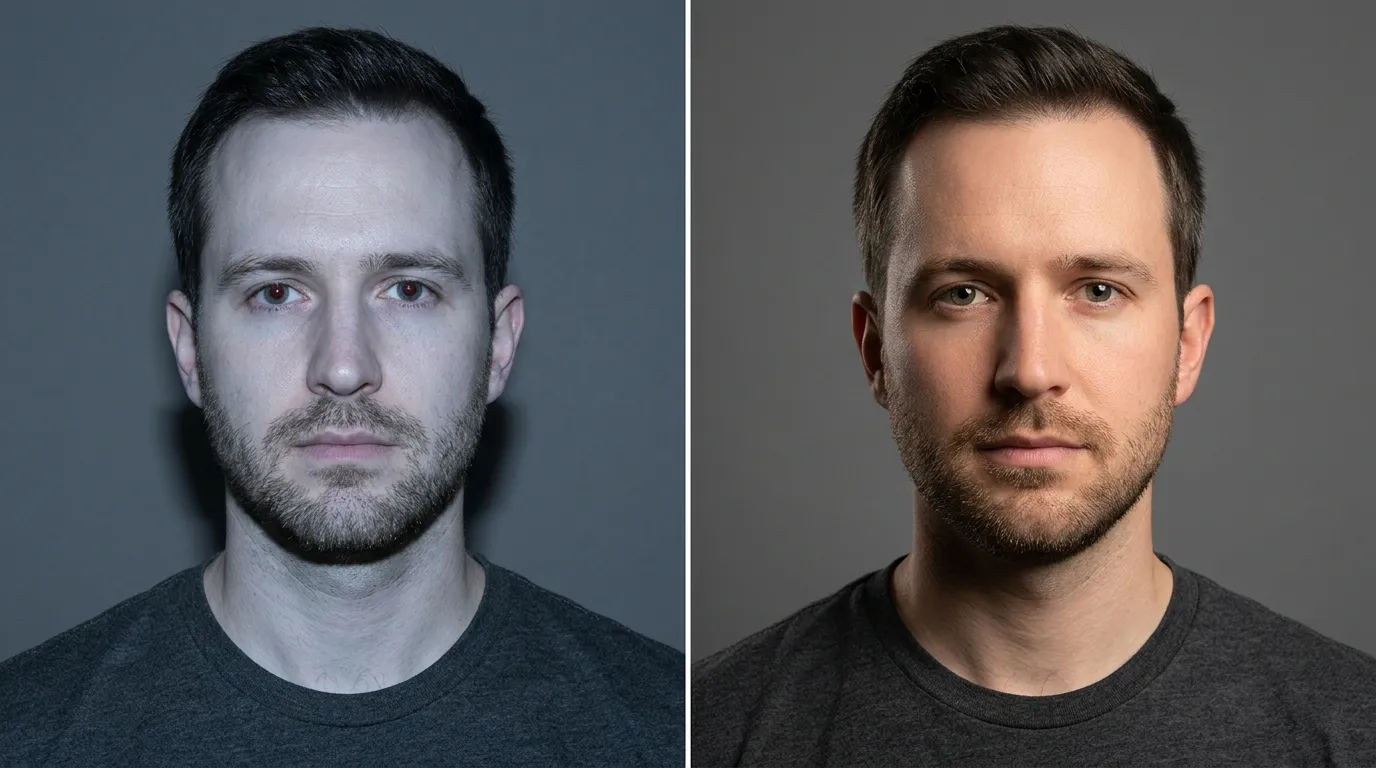
Realism in AI dating photos is decided before you generate anything. Feed the model 10 to 15 sharp reference photos shot at portrait focal length (not arm's-length selfies), pick a LoRA-trained tool over a zero-shot one, then run every output through a seven-point audit before it ever touches your profile.
That's the short version. What follows is the photographer's version: the specific tells that break a dating photo, the reference-set standards that matter more than your choice of generator, and the curation rule I use to cut 100 generations down to the 4 or 5 worth uploading.
 Before
 After
AfterStudio / Private by design
See yourself shot properly.
Use our AI dating photo generator to create profile pictures from four everyday selfies. Your uploads are encrypted, never used to train AI, and become inaccessible five days after upload.
Or quick sign-in from here
Why "It Looks AI" Kills Matches
The stakes are real. 56% of U.S. singles treat AI-generated or heavily edited photos as a red flag, per a February 2026 eJuiceDB survey of 1,000 daters reported by Global Dating Insights. 41% say looking noticeably different in person from your profile pictures kills attraction. And 64% of daters say it would bother them to learn a match used AI on their photos, per Get Stream's 2025 dating statistics roundup. One vendor study (UnrealPhotos, industry source) estimates profiles with any AI photo see a 37% lower average match rate than profiles with authentic photos only. Bad AI photos actively hurt you.
Here's the confusing part. A widely cited Censuswide poll commissioned by GetMatches.ai in February 2025 reports that 75% of UK dating-app users believe they have spotted AI-generated profiles in recent months. Peer-reviewed research tells a different story. Nightingale and Farid, publishing in PNAS in 2022, ran three experiments totaling 757 participants and found people were roughly at chance (around 50%) at telling AI-generated faces from real ones. A 2025 study from Vrije Universiteit Amsterdam (Zhu et al.) found detection accuracy on dating-profile photos fell below chance overall. So which is it?
Both. In the lab, on a polished AI face with no hand in frame, people guess wrong. In the wild, on a dating profile, people spot the hand with six fingers, the shadowless grip, the earring on only one ear. The "75% can spot AI" number is really "75% think they can spot obviously bad AI." The moment you fix the obvious tells, you disappear into the other half.
That's the whole game, and it starts with the tells.
The 5 Tells That Break a Dating Photo
Most online AI-detection guides audit faces in isolation. Dating photos include smiles, outfits, jewelry, and real-world backgrounds, which changes which tells matter most. Here are the five I check on every generated image before it goes anywhere near a profile.
1. Hands and fingers
AIorNot's hand-artifact catalog lists the patterns worth memorizing: extra or missing fingers, fingers that merge into each other, impossible joints, missing knuckles, and the "impossible grip," where a hand wraps around a coffee cup or a phone with no shadow cast on the object. Shadows are what your brain uses to confirm physical contact. When they're missing, the photo feels wrong even if you can't articulate why. Check every finger count. Zoom to 200%. If the hand is holding something, the shadow has to be there.
2. Teeth
Smiling dating photos are the primary use case, and mouths are where diffusion models consistently fall short. The Conversation's 2023 guide on spotting AI images names teeth as a recurring failure mode. The tells are specific: teeth rendered as an even white bar with no individual tooth boundaries, extra or missing teeth in a wide smile, asymmetric canines, gum lines that don't follow the arc of the jaw. Closed-mouth smiles are safer than open ones in AI output (most phone front cameras also render closed-mouth smiles more flatteringly, which is why headshot photographers default to them). If the teeth look like a graphic, they are one.
3. Jewelry and paired accessories
The New York Times' January 2024 interactive quiz on AI-generated images calls out asymmetry on paired accessories as a specific tell. Earrings that differ between the left and right ear. A chain that disappears under a collar and reappears with the wrong link shape. A watch face that renders as an abstract metal blob. A necklace clasp that makes no physical sense. If you wear paired accessories in your reference photos, audit them carefully on every output. And if the output has jewelry you never actually wore, that's the AI inventing details, which is a different problem entirely (the disclosure line starts here).
4. Plastic skin
PetaPixel's March 2024 photographer-voiced guide on AI tells names this as the fastest-read giveaway in thumbnails: hyper-smooth skin with no visible pores, no fine lines, no stubble shadow, identical texture on cheeks and forehead. Real skin has texture. Real skin catches light unevenly. The trick is pores. Zoom in on the cheek at 200%. If the surface looks like ceramic glaze instead of skin, the photo is going to trigger something in viewers' pattern recognition, even if they couldn't tell you what.
5. Background geometry and repetition
CanIPhish's AI-image detection guide calls warped straight lines in backgrounds "a dead giveaway." Door frames, window frames, shelves, bookcases, railings, architectural edges (anything a real camera would render as a straight line) in AI output often curve, shift, or misalign. PetaPixel flags a second background tell that matters more in crowd and foliage shots: texture repetition. Diffusion models synthesize patterns rather than photograph them, so bricks tile, leaves repeat, and faces in a blurred crowd blend into each other. Check the edges and the corners. Anything that should be a straight line is the first thing to audit.
Input-Photo Quality Beats Tool Choice
Most "best AI dating photo apps" listicles miss the same point. The biggest single lever on realism isn't which generator you pick. It's what you feed it. Every tool is trying to learn one face: yours. If your references are four bathroom-mirror selfies shot at arm's length, the model learns "a person who lives in a bathroom with stretched facial proportions." That's what ends up on your profile.
The published minimums vary by tool. Photo AI asks for 5 to 20 reference photos with high variety. The independent engineer Cory Zue, author of the clearest free LoRA walkthrough I've found, trains his own models on 10 to 15 varied shots and notes that "the more diverse the dataset the better." ArtSmart's technical guide on LoRA fine-tuning puts the photorealism tier at 20 to 40 high-resolution images. Zero-shot tools work differently. Sozee warns that uploading multiple photos to single-reference generators "often leads to confusion and mismatched features," so on those tools you use your strongest single shot.
What counts as a usable reference photo?
| Check | Acceptance standard |
|---|---|
| Focus | Eyes sharp at 100% zoom |
| Focal length | 50 to 135mm equivalent (rear camera at 2x, not front camera at arm's length) |
| Lighting | Even light on the face (natural window light is easiest) |
| Expression variety | At least 3 different expressions across the set |
| Angle variety | Straight-on, three-quarter, and at least one profile |
| Single subject | You alone in every frame (no friends in background) |
| Filters | None |
| Resolution | Full-size phone output, not compressed messaging-app copies |
The 22 to 28mm equivalent of most phone front cameras is the quiet killer in this process. Google Research and MIT documented how wide-angle focal lengths cause perspective distortion in selfies: wider nose, smaller ears, longer face. Portrait photographers shoot at 85 to 135mm precisely because those focal lengths give natural facial compression, per PhotographyLife's focal-length reference. Feed the AI a training set of arm's-length front-camera selfies and you're teaching it that your face is shaped like a distorted selfie. The output will preserve the distortion, just in nicer lighting. Our sister post on why you look bad in photos covers the lens math in detail.
The fix is boring and it works: rear camera, 2x zoom, phone propped on a stack of books, timer mode, two different lighting setups across two days. If you have a friend who can hold the camera at a natural conversation distance, even better.
Model Choice Matters (Less Than You Think)
Three technical approaches dominate this space, and they matter for realism in different ways.
LoRA fine-tuning trains a lightweight adapter on your reference photos and combines it with a base model (usually Stable Diffusion or FLUX). It's what most serious dating-photo apps use under the hood, and it's what gives you consistent identity across a batch. Modal's comparative benchmark piece rates FLUX.1 Dev LoRA and FLUX 2 Pro above Stable Diffusion 3.5 Large for "full-portrait subject consistency," though SD 3.5 Large has an edge on tight eye crops.
DreamBooth preserves identity even better than LoRA for realistic faces, per the andyhtu.com personalization-techniques comparison. But the training is heavier (12GB VRAM floor, GB-scale model outputs) and most consumer apps don't offer it as a user-facing choice.
Zero-shot models (Sora-style generators, InstantID, single-reference tools like Sozee or Pincel) skip training entirely. You upload one photo, the model extracts facial landmarks through something like InstantID's IdentityNet (see arxiv 2401.07519), and generates new scenes in seconds. They're fast and they tend to drift more across a batch. For dating photos, one strong high-resolution reference works better than five mediocre ones in a zero-shot tool.
The realism gap shows up in field tests. TruShot's 2025 field test of 8 tools scored them on realism: TruShot 9/10, Aragon 7.5/10, Narkis.ai 7/10, ProfileBakery 6.5/10, PhotoAI 6/10, BetterPic 6/10, HeadshotMaster 4/10, Remini 4/10, Lensa 2/10. The lower-scoring tools aren't using worse AI. They're using older pipelines with looser identity preservation and less artifact-aware filtering. Our AI photo apps for dating breakdown has the full ranking logic.
Style context matters too. TruShot found that BetterPic produced 40% lower first-message response rates because its corporate LinkedIn-style outputs read as "too professional" in a dating context. Realism for the wrong category is still a failure mode. The photo has to look real and look like a dating photo.
The Final 6: Curation Is Where Realism Happens
Here's the number that reframes this whole workflow. TruShot's field test of Aragon AI found the tool delivered "3 to 5 usable photos per 100 generated" due to face drift and hand-proportion errors. That's a 3 to 5 percent yield. If you're uploading the first 6 the tool spits out, you're uploading the rejects.
The curation step is the realism step. Here's the seven-point audit I run on every generation before it makes the cut.
| Check | What to look for |
|---|---|
| Identity | Does it still look like you at thumbnail size? |
| Hands | All fingers present? Shadows on any grip? |
| Teeth | Individual tooth boundaries visible, no even white bar |
| Jewelry | Paired accessories match? No invented metal? |
| Skin | Visible pores? Texture uneven across the face? |
| Background | Straight lines straight? No tiling in foliage or crowd? |
| Consistency | Same person across your final 4 to 6 photos? |
A photo has to pass all seven to upload. Most generations won't, and that's why the yield is so low.
Then the friend test. Narkis.ai's 2026 editorial on dating-photo generators puts it bluntly: "Show them to a friend and ask: does this look like me? If there's any hesitation, skip that photo." TruShot's version is sharper: "If your close friends can't recognize you, matches won't either."
The Nightingale and Farid PNAS paper found that AI-synthesized faces were judged as slightly more trustworthy than real ones, with a 7.7% trust uplift in controlled conditions. Interesting in a lab. In your pocket, the only jury that matters is your friend group. If Aisha or Marcus hesitates when they see the photo, cut it.
How Dating Image Pro Handles the Reference-Photo Problem
A short word on how we fit in. Dating Image Pro takes four selfies, applies a curated scene or reference photo, and returns dating-ready photos in minutes. Web source uploads are encrypted, never used for AI training, and expire after five days. The product uses one-time photo credits with no subscription. Review every result with the seven-point audit above, then see the Web Studio workflow for the current product details.
The audit still falls to you. No tool does that part yet.
5 Mistakes That Tank Realism
- Feeding the model selfies. Phone front cameras (22 to 28mm equivalent) distort facial proportions, and the model inherits the distortion. Use the rear camera at 2x.
- Filling all 6 Hinge slots with AI. Hinge requires 6 photos. TruShot data on no-matches profiles found that one weak photo cuts overall attractiveness ratings by 34%. Mix 2 or 3 AI outputs with 3 or 4 real photos. Never go fully synthetic. Our guide to dating photo mistakes has the broader list.
- Skipping the friend test. Everyone thinks their AI photos look like them. Half the time they don't. Five minutes with a friend saves you a bad first date.
- Generating 50 and reviewing 20. The best shot is rarely in the first batch. Generate 100 and audit each one, and expect to keep 3 to 5.
- Treating face-swap output as "AI dating photos." Face-swap tools don't preserve your actual face, so the output is a different person. That's the catfish boundary, and no amount of realism tweaking crosses back.
Quick Reference: The Realism Audit
Save or screenshot this. Run it on every AI output before uploading.
| Check | Standard | Where to look |
|---|---|---|
| Thumbnail identity test | Still recognizably you | Phone gallery thumbnail view |
| Finger count | 5 on each visible hand | Hand close-ups at 200% zoom |
| Grip shadows | Shadow on any touched object | Coffee cup, phone, wine glass |
| Teeth boundaries | Individual teeth visible | Smile zoomed to 200% |
| Paired accessories | Left matches right | Earrings, cuffs, collar, sleeves |
| Skin texture | Pores visible on cheek | Face at 200% zoom |
| Background lines | Straight lines stay straight | Door frames, window frames, shelves |
If any line fails, the photo does. That's the rule that drops the 100-generation pile down to a usable 4 or 5.
Questions, answered.
01Can dating apps detect AI photos?+
Partially. Bumble added a reporting mechanism in July 2024 for profiles suspected of using AI-generated photos, and its broader Deception Detector has reportedly blocked 95% of accounts identified as spam or scam. Hinge's AI Principles allow enhancement but ban misrepresentation. Automated detection is imperfect: peer-reviewed work by Nightingale and Farid (PNAS 2022) found humans perform near chance on clean AI faces, and a 2025 Vrije Universiteit Amsterdam study found accuracy on dating-profile photos fell below chance. The practical detection happens via the tells in this guide (hands, teeth, jewelry, skin, backgrounds), not server-side classifiers.
02How many AI photos should I have on my dating profile?+
Not more than 2 or 3 out of 6 total. Hinge requires 6 photos. TruShot data on no-matches profiles found one weak photo cuts overall attractiveness ratings by 34%, which means an obviously-AI photo can drag your whole profile down. Keep 3 or 4 real phone photos as your anchor set and use AI outputs for scenes you couldn't easily shoot (outdoor, studio-lit, different outfit). Never go fully synthetic.
03What is the difference between LoRA and zero-shot AI photo tools?+
LoRA fine-tunes a lightweight adapter on 10 to 40 of your reference photos and combines it with a base model (like FLUX or Stable Diffusion). Zero-shot tools like InstantID or Sora-style models skip training and generate from a single reference via facial landmark extraction. LoRA produces more consistent identity across a batch of photos. Zero-shot is faster but drifts more, so one strong high-resolution input works better than multiple mediocre ones. Modal's benchmark rates FLUX.1 Dev LoRA and FLUX 2 Pro above SD 3.5 Large for full-portrait subject consistency.
04Do I need to disclose that I used AI on my dating profile?+
No dating app strictly requires disclosure yet, but the social signal matters: 64% of daters say it would bother them to learn a match used AI, per Get Stream. Hinge's official AI Principles state generative AI "should not be used to misrepresent yourself or your intentions." The cleaner path is to make the photos actually look like you, so there is no misrepresentation to disclose. If you've generated a scene or expression you never actually had, a one-line bio note like "first photo is AI-styled, rest are phone pics" preempts awkward questions.
05What is the minimum number of reference photos for a realistic AI output?+
Eight to 15 is the practical floor for LoRA-trained tools. Photo AI accepts 5 to 20 with high variety. Cory Zue's independent LoRA walkthrough uses 10 to 15. ArtSmart's technical guide recommends 20 to 40 for strict photorealism training. Zero-shot tools like Sozee or Pincel work from one strong reference. Diversity of angle, lighting, and expression matters more than sheer count: four similar selfies will teach the model less than six well-varied shots.
06How can I tell if my AI dating photo will hold up on a first date?+
Run the friend test and the seven-point audit. Narkis.ai's editorial puts it plainly: show the photo to a friend, ask "does this look like me?" and if there's any hesitation, cut it. TruShot's version: "If your close friends can't recognize you, matches won't either." The seven-point audit covers hands, teeth, jewelry, skin, backgrounds, thumbnail identity, and consistency across your final 4 to 6 photos. The 41% of daters who say looking noticeably different in person kills attraction (eJuiceDB / Global Dating Insights, February 2026) are the people you're protecting yourself from with this step.
Author / reviewed profile
Maya Rodriguez
Maya is a professional portrait photographer with 12 years of experience. She's photographed everything from corporate headshots to dating profiles, and she knows exactly what makes a photo stand out.